Properties
Global settings can be made via the main menu.
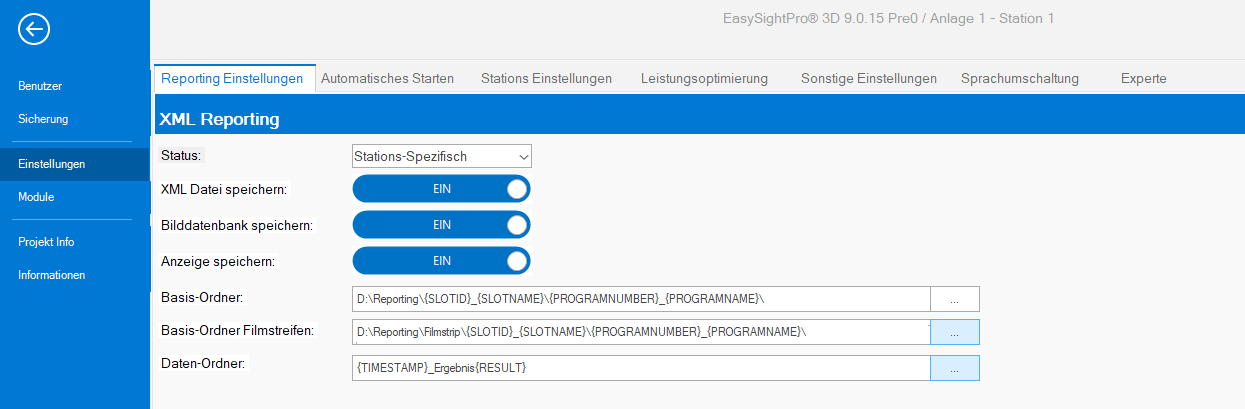
 Reporting settings
| State | Not active: Reporting is switched off (for all stations) All: Saves all results (for all stations) FAIL only: Saves all NIO results (for all stations) PASS only: Saves all IO results (for all stations) JobSlot specific: Saving can be activated/deactivated via the station menu (default) |
| Save XML file | Enables writing the XML file with all check parameters. |
| Save image database | Activates the writing of the raw images. |
| Dave display | Activates the writing of the image display record. This record is required for the extended display in EasyReportingViewer. |
| Base directory | Base folder for regularly stored reporting data. |
| Base directory filmstrip | Base folder for reporting data saved via the filmstrip. |
| Data directory | Structure of the data folder. This folder is generated for each result and contains all reporting data. |
Automatical startup
| Activate | ON: EasySightPro® is started automatically when Windows user logs in. |
| Activate | ON: When EasySightPro®is started, the startup programs are loaded and the station is activated. |
| Timeout Programm | Timeout in milliseconds when loading the program. |
| Timeout Station | Timeout in milliseconds when switching the station online/offline. |
| Keep active program as startup | ON: After each program change, the changed program is set as the start program. |
| Load layout | ON: Automatically loads the saved window layout when starting EasySightPro®. |
JobSlot settings
| Do not link exposure | ON: When linking a program, the exposure time is not taken over from the main program. |
| Do not link contrast | ON: When linking a program, the contrast is not taken over by the main program. |
| Do not link brightness | ON: When linking a program, the brightness is not taken over from the main program. |
| No job change (editing) | ON: Any program change from external will be prevented when the program is edited. |
| No job change (unsaved) | ON: Any program change from external will be prevented if the program has been changed and not saved. |
| TriggerWait Timeout (ms) | Timeout in milliseconds for the command "TriggerAndWait" |
| Show active window | ON: When a station is activated (online), the display window is switched to the foreground. |
| Autom. memory optimization (Job): | ON:When a inspection program is loaded, the memory optimization is automatically executed. This sets the 'LastRunRecordEnable' property of each tool to None. This has a positive effect on the RAM usage of each inspection result. |
| Activate | OFF: Program Cache is completely disabled and cannot be used. ON: Activates the Program Cache. |
| Load all jobs on startup | ON: Loads all programs (for all stations) into the cache (Ram) when starting EasySightPro®. |
Performance tuning
| Activate | ON: Activates the VisionPro multithreading. If several stations are operated in parallel, then multithreading can have a negative effect on the cycle time, since deterministics are influenced. |
| Hardware specific | ON: Generates the number of allowed threads depending on the hardware (CPU cores). |
| Number threads | Number of threads per vision tool when "Hardware specific" is disabled. |
| Free below | If the free memory drops below this threshold, then the automatic garbage collection is triggered. |
| Activate | ON: Activates automatic memory monitoring |
| Threshold | If memory monitoring is active, all stations are stopped when the free memory falls below the threshold. After falling below, an attempt is made to free up memory. If enough memory is free, then the stations are restarted. |
Miscellaneous settings
| Auto logout | ON: Automatically logs off the current users when this is inactive. |
| Timeout (s) | Inactivity timeout in seconds. |
| Send simulation results | OFF: Simulation results are not transferred to the communication modules. ON: Simulation results are transferred to the communication modules.. |
| Systeminterval sync. (ms) | In this interval (milliseconds) all system states are synchronized with the communication modules. System states are for example: online/offline, active program |
| Fieldbus/IO sync. (ms) | In this interval (milliseconds) the input and output data of the fieldbus and I/O modules are synchronized. A too low timeout can lead to a high CPU base load of the controller. |
| Camera Auto-IP-Address | ON: The IP addresses of the cameras are automatically matched to the network card when EasySightPro®is started. |
| System shutdown in x (s) | Waiting time between triggering the external shutdown (via communication module) and execution. This gives the user the possibility to abort the process. |
| Standard backup mode | "Zip file" or "Folder structure": This mode is used for starting backups externally (PLC or external systems). |
| Touch graphic size | Size of VisionPro Edit graphics in pixels to make them easier to use with touch screens. |
| Experimental functions | ON: Activates functions marked as experimental in this version OFF: Deactivates the experimental functions |
| Baumer Wizard | ON: Uses the Baumer camera wizard in the live image OFF: Uses the standard live image wizard |
| Start automatically | ON: Starts WebHMI automatically in the background with EasySightPro. |
| Scale image | 0: Camera image is transferred to the WebHMI in original size >0: the longest side of the image is reduced to the set size. The image scaling is retained |
| Image format | Image format for transferring the resulting image to the WebHMI. |
| Diagnostic message in log | If this option is active, the required image conversion time is displayed in the messages. This function supports the optimization of image transmission to the WebHMI. |
| Cognex Dataman as a camera | Integrates Cognex Dataman code reader via SDK as image acquisition camera in EasySightPro. A change is only applied after a restart! |
Language selection
| Systemstandard | EasySightPro® language corresponds to the Windows system language. |
| Deutsch | EasySightPro® language is set to German. |
| Englisch | EasySightPro® Sprache wird auf English gesetzt. |
Expert
Warning: These settings change the core behavior of important functions and should only be changed with extreme caution!
| Mode | Local/Server: Switching between local DeepLearning or server/client architecture (Support from EasySightPro® 9.1.0) With GPU/Without GPU: Switch between operation with or without graphics card (for local DeepLearning). |
| Server address | IP address of the DeepLearning server for client/server operation |
| Max. size image buffer | Maximum size of the image memory. (Default: 10) Here, images are stored temporarily that have not yet been evaluated. |
| Communication timeout (ms) | Communication timeout in milliseconds for monitoring the camera connection |
| Use image buffer | No longer used |
| Use results buffer | No longer used |
| Max. size image buffer | No longer used |
| max. size results buffer | No longer used |
| Use image buffer | OFF: Image memory is not used (default) ON: Image memory is used (Only for special cases) |
| Use results buffer | OFF: Results are not generated (Only for special cases) ON: Results are generated (default) |
| Max. size image buffer | Maximum image size for the image capture tasks. (Default: 10) |
| Max. size results buffer | Maximum size of the result memory. (Default: 1) |